I wanted a personal agent that lived where I already communicate, remembered the right context, and could do more than produce a clever response. The interesting part was not connecting a language model to Telegram. The interesting part was deciding where conversational autonomy should stop and where a structured workflow system should begin.
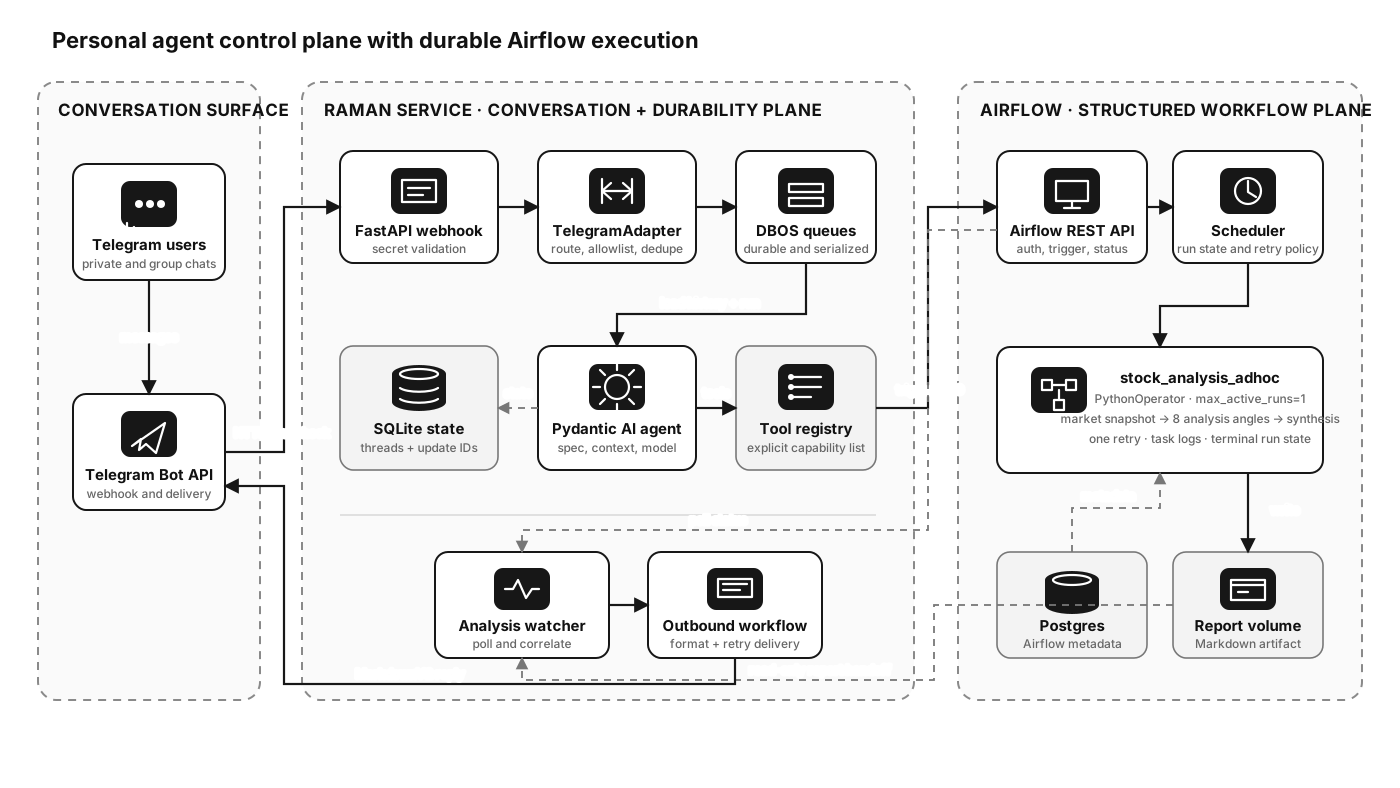
Raman became my answer: a small ecosystem of personalized Pydantic AI agents behind Telegram and FastAPI, a DBOS-backed conversational gateway for durable message handling, and Apache Airflow for jobs that need an explicit run boundary, retries, status, logs, and a durable artifact. This post explains the architecture, the implementation choices, and what the combination makes possible.
The design idea
An agent loop and a workflow scheduler solve different problems.
The agent is good at interpreting an underspecified request, selecting a capability, carrying conversational context, and explaining the result in a useful way. Airflow is good at making a multi-minute job visible and operable: it gives the job an identity, records state transitions, applies retry and concurrency policy, captures logs, and exposes status through an API.
Trying to make either one own the whole system creates awkward trade-offs. If the Telegram request waits for a long analysis, the webhook becomes fragile and the user gets no clean status boundary. If every interaction becomes an Airflow DAG, ordinary conversation acquires unnecessary operational weight. Raman therefore uses three layers:
- Conversation layer — Telegram adapters, agent selection, message formatting, and user-facing acknowledgements.
- Durability layer — DBOS queues and workflows, plus SQLite conversation state and webhook deduplication.
- Orchestration layer — Airflow DAGs for bounded, observable, long-running jobs and their output artifacts.
flowchart LR
    U["User in Telegram"] -->|"message, image, audio, or command"| TG["Telegram Bot API"]

    subgraph Raman["Raman service"]
        API["FastAPI webhook surface"]
        ADAPTER["TelegramAdapter<br/>auth, routing, dedupe"]
        DBOS["DBOS inbound and outbound queues"]
        STORE[("SQLite<br/>threads and update IDs")]
        AGENT["Pydantic AI agent"]
        TOOLS["Allowlisted tool registry"]
        WATCH["Analysis watch dispatcher"]
    end

    subgraph Airflow["Airflow execution plane"]
        REST["Airflow 3 REST API"]
        DAG["stock_analysis_adhoc DAG"]
        TASK["PythonOperator<br/>analysis workflow"]
        LOGS["Run state, retries, logs"]
    end

    REPORT[("Shared report volume")]

    TG --> API --> ADAPTER --> DBOS
    DBOS <--> STORE
    DBOS --> AGENT --> TOOLS
    TOOLS -->|"trigger DAG"| REST --> DAG --> TASK
    DAG --> LOGS
    TASK -->|"write Markdown"| REPORT
    WATCH -->|"poll run"| REST
    WATCH -->|"read when successful"| REPORT
    WATCH --> DBOS -->|"formatted reply"| TG
The important property is that the LLM never becomes the workflow engine. It can choose an approved tool and supply validated arguments, but the tool creates a normal Airflow run. Once that happens, Airflow—not the model—owns execution.
Building personalized agents from specifications
I did not want a single universal prompt with a large bag of tools. Raman treats an agent as configuration plus a small amount of runtime assembly. Each agent lives under spec/<agent>/ and has an agent.toml, a system prompt, optional local or shared context, an explicit tool list, and model settings.
For example, the Leo agent is allowed to perform market-oriented actions:
name = "Leo"
description = "Group assistant agent for Telegram chats."
system_prompt = "system_prompt.md"

shared_context_files = ["context/production.md"]
tools = [
  "web_search",
  "watchlist",
  "company_card",
  "todo_list",
  "reminder",
  "deep_analysis",
]

[model_settings]
temperature = 0.3
openai_prompt_cache_retention = "24h"
The Raman agent has a narrower personal-assistant toolset. Gobind adds a shared grocery list for a group chat. Coder is a CLI-only agent with repository tools and a command policy; the HTTP layer rejects it because its specification sets cli_only = true.
This is more than prompt organization. The tool list is a capability boundary. A tool name must exist in a Python TOOL_REGISTRY, and build_agent() resolves only the names listed in that agent's specification. A misspelled or unavailable tool fails agent construction instead of silently widening behavior.
flowchart TB
    TOML["agent.toml<br/>identity, tools, model settings"]
    PROMPT["system_prompt.md"]
    SHARED["shared context and policy"]
    SPEC["load_spec() -> AgentSpec"]
    REGISTRY["TOOL_REGISTRY<br/>name -> async callable"]
    RESOLVE["_resolve_tools()<br/>fail closed on unknown names"]
    MODEL["build_model()<br/>Ollama or DigitalOcean inference"]
    BUILD["build_agent()"]
    AGENT["Pydantic AI Agent"]

    TOML --> SPEC
    PROMPT --> SPEC
    SHARED --> SPEC
    SPEC --> RESOLVE
    REGISTRY --> RESOLVE
    SPEC --> BUILD
    RESOLVE --> BUILD
    MODEL --> BUILD
    BUILD --> AGENT
The factory is deliberately small:
def build_agent(spec: AgentSpec, settings: RamanSettings):
    tools = _resolve_tools(spec)
    set_command_policy(spec.load_command_policy())
    return Agent(
        build_model(settings),
        name=spec.name,
        description=spec.description,
        instructions=[
            spec.instructions,
            agent_identity(spec.name),
            current_datetime,
        ],
        tools=tools,
        model_settings=spec.model_settings or None,
        history_processors=[isolate_stored_tool_results],
    )
Pydantic Settings provides the environment boundary. The same agent definitions can use a local Ollama-compatible endpoint in development and an OpenAI-compatible DigitalOcean inference endpoint in production. Provider selection is centralized in build_model() rather than leaking into prompts or tools.
Why separate bots as well as agents?
spec/telegram.toml maps bot identities to default agents and to the environment variable names that contain each bot's credentials and allowlist:
default_bot = "raman"

[[bots]]
name = "raman"
default_agent = "raman"
token_env = "TELEGRAM_BOT_TOKEN"
webhook_secret_env = "TELEGRAM_WEBHOOK_SECRET"
allowed_chat_ids_env = "TELEGRAM_ALLOWED_CHAT_IDS"

[[bots]]
name = "leo"
default_agent = "leo"
token_env = "LEO_TELEGRAM_BOT_TOKEN"
webhook_secret_env = "LEO_TELEGRAM_WEBHOOK_SECRET"
allowed_chat_ids_env = "LEO_TELEGRAM_ALLOWED_CHAT_IDS"
That gives each persona a distinct Telegram identity and least-privilege audience while still reusing the same FastAPI process, gateway, storage model, and agent factory. The API exposes /telegram/{bot_name}/webhook, with /telegram/webhook as an alias for the configured default.
Turning Telegram into a reliable agent surface
Telegram's Bot API is intentionally treated as an adapter, not as the agent runtime. TelegramAdapter translates an update into an internal InboundMessage; the rest of the system operates on the internal message shape.
Before anything reaches the model, the adapter:
- validates the webhook secret in the FastAPI route;
- claims the
(bot_name, update_id)in SQLite so Telegram retries are idempotent; - rejects chats outside that bot's allowlist;
- routes group messages only when the bot is mentioned or replied to;
- gives group administrators control over state-changing commands such as
/agent; - downloads supported image, audio, or video attachments;
- handles
/start,/help,/reset,/clear, and/agentwithout an LLM call when possible.
After the model responds, Markdown is converted to Telegram MarkdownV2 with telegramify-markdown, tables are collapsed into a chat-friendly form, and long replies are split on entity-aware boundaries under Telegram's message limit.
sequenceDiagram
    autonumber
    participant User
    participant TG as Telegram
    participant API as FastAPI webhook
    participant Adapter as TelegramAdapter
    participant Store as ThreadStore
    participant InQ as DBOS inbound queue
    participant Agent as Pydantic AI Agent
    participant OutQ as DBOS outbound queue

    User->>TG: Send message or attachment
    TG->>API: POST /telegram/{bot}/webhook + secret header
    API->>API: Validate bot and webhook secret
    API->>Adapter: handle_update(payload)
    Adapter->>Store: claim_telegram_update(bot, update_id)
    alt Duplicate update
        Store-->>Adapter: false
        Adapter-->>TG: 200 duplicate
    else New, allowlisted update
        Store-->>Adapter: true
        Adapter->>InQ: enqueue InboundMessage
        InQ-->>TG: webhook acknowledged
        InQ->>Store: load selected agent and history
        InQ->>Agent: run prompt with message history
        Agent-->>InQ: response plus updated history
        InQ->>Store: persist history
        InQ->>OutQ: enqueue reply event
        OutQ->>TG: sendMessage with retries
        TG-->>User: Rendered response
    end
The FastAPI webhook acknowledges after enqueueing; it does not stay open while the model runs. That single boundary makes Telegram retries, model latency, and delivery retries separable problems.
Why DBOS sits between Telegram and the agent
Conversational state creates a read-modify-write race: load history, run the model, then save the expanded history. If two messages from the same chat run concurrently, both can read the same old history and one write can erase the other turn.
Raman uses two DBOS queues, inbound and outbound, both currently configured with concurrency=1. The inbound queue serializes history updates. The outbound queue isolates Telegram delivery and its rate limits from agent execution. DBOS records workflow state in its own database and provides retryable steps for sends.
Application state remains straightforward SQLite:
| Store | Purpose |
|---|---|
threads |
Selected agent and serialized Pydantic AI history, keyed by (interface, external_thread_id) |
telegram_updates |
Per-bot Telegram update deduplication |
analysis_watches.json |
Pending Airflow runs that must eventually be delivered to a chat |
dbos.sqlite3 |
DBOS workflow and queue state in the default local configuration |
The single-worker queue is a correctness choice, not a long-term scaling design. The natural next step is partitioning by a stable hash of the thread key: different chats could run in parallel while messages within one chat remain ordered.
Connecting an agent tool to Airflow
The deep_analysis tool is the bridge. Leo can select it when the user explicitly asks for a deep research memo or a comparison of up to three stock symbols. The function itself does not do the research. It validates the boundary and creates an Airflow run.
Its responsibilities are intentionally small:
- Confirm the Airflow endpoint and credentials exist.
- Confirm the call came from Telegram, because that is the supported delivery surface.
- Normalize and validate one to three ticker symbols with a strict character policy.
- Send an immediate “started” acknowledgement to the chat.
- Authenticate to Airflow 3 at
/auth/token. - Create a DAG run through
POST /api/v2/dags/{dag_id}/dagRuns. - Store a watch containing the DAG run ID, bot, chat, symbols, and creation time.
- Return control to the conversation immediately.
Raman uses httpx rather than importing Airflow. That keeps the agent service small and makes the integration an ordinary service boundary. Airflow can be upgraded or moved without turning the Telegram process into an Airflow runtime.
sequenceDiagram
    autonumber
    participant User
    participant Leo as Leo agent
    participant Tool as deep_analysis tool
    participant API as Airflow 3 API
    participant DAG as stock_analysis_adhoc
    participant Report as Shared report volume
    participant Watch as DBOS analysis dispatcher
    participant TG as Telegram delivery

    User->>Leo: Deeply compare AAPL and MSFT
    Leo->>Tool: deep_analysis("AAPL, MSFT")
    Tool->>Tool: validate surface, credentials, and symbols
    Tool->>TG: Immediate start acknowledgement
    Tool->>API: POST /auth/token
    API-->>Tool: bearer token
    Tool->>API: POST /api/v2/dags/stock_analysis_adhoc/dagRuns
    API-->>Tool: dag_run_id
    Tool->>Watch: persist pending watch
    Tool-->>Leo: analysis started
    Leo-->>User: Result will arrive asynchronously

    DAG->>DAG: fetch market snapshots and run analysis
    DAG->>Report: write {dag_run_id}.md
    loop Every minute until terminal or timeout
        Watch->>API: GET DAG run status
        API-->>Watch: queued, running, success, or failed
    end
    alt Success
        Watch->>Report: read Markdown memo
        Watch->>TG: deliver memo
        TG-->>User: Deep-analysis report
    else Failed or older than 45 minutes
        Watch->>TG: deliver actionable failure message
    end
What Airflow owns in the current implementation
The DAG is unscheduled and has max_active_runs=1, one retry, and a five-minute retry delay:
with DAG(
    dag_id="stock_analysis_adhoc",
    schedule=None,
    catchup=False,
    max_active_runs=1,
    default_args={"retries": 1, "retry_delay": timedelta(minutes=5)},
) as stock_analysis_adhoc:
    PythonOperator(
        task_id="write_stock_analysis_report",
        python_callable=_run_stock_analysis,
    )
There is one Airflow task today. Inside that Python task, the workflow fetches verified market snapshots through yfinance, runs eight research sections per company—business, fundamentals, valuation, moat, risks, catalysts, sentiment, and verdict—and then asks the model for a final synthesis. A multi-symbol request adds a head-to-head comparison. The report is Markdown and ends with an explicit AI-generated-research disclaimer.
That distinction matters. The eight sections are not eight independently retryable Airflow tasks. Airflow currently owns the run boundary: queueing, the single retry policy, maximum active runs, run status, task logs, and the output handoff. If section-level parallelism, caching, or partial retries become important, the DAG can later expand into multiple tasks without changing the conversational contract.
Completing the asynchronous loop
Triggering a DAG is only half an agent experience. The result has to find its way back to the exact chat that requested it.
AnalysisWatchStore records that correlation. A DBOS scheduled workflow runs every minute, loads pending watches, and asks Airflow for each run's state. On success it reads <dag_run_id>.md from the report directory and sends it through the normal Telegram delivery path. Terminal failure becomes a concise failure reply. A run still pending after 45 minutes is treated as stuck, and repeated Airflow API errors are capped rather than retried forever.
The artifact handoff uses a named Docker volume. Airflow mounts it read-write; Raman mounts the same volume read-only:
services:
  raman:
    environment:
      AIRFLOW_API_URL: http://airflow-webserver:8080
      RAMAN_ANALYSIS_REPORT_DIR: /data/analysis-reports
    volumes:
      - raman-state:/app/.raman
      - analysis-reports:/data/analysis-reports:ro

  airflow-webserver:
    environment:
      ANALYSIS_REPORT_DIR: /data/analysis-reports
    volumes:
      - analysis-reports:/data/analysis-reports
The read-only mount is a useful architectural constraint: the conversational service can deliver a report but cannot rewrite the workflow's result. In a larger deployment, object storage plus a signed artifact reference would be the natural replacement for the shared volume; the correlation model would stay the same.
Deployment topology
The production stack runs as Docker Compose services behind Caddy. Caddy terminates TLS and exposes Raman's FastAPI health and webhook surface. Raman and Airflow communicate on the internal Docker network. Airflow persists its metadata in Postgres; Raman keeps its application state in a named volume. The Airflow API credentials are injected through environment variables and never appear in agent specifications.
flowchart TB
    Internet["Internet"] --> Caddy["Caddy<br/>TLS and reverse proxy"]
    Caddy --> Raman["Raman FastAPI container"]

    subgraph Internal["Private Docker network"]
        Raman -->|"REST + bearer token"| AirflowAPI["Airflow API server"]
        Scheduler["Airflow scheduler"] --> Worker["Airflow task process"]
        AirflowAPI --> Postgres[("Postgres metadata DB")]
        Scheduler --> Postgres
        Worker --> Postgres
        Raman --> RamanState[("raman-state volume")]
        Worker -->|"read-write"| Reports[("analysis-reports volume")]
        Raman -->|"read-only"| Reports
    end

    Telegram["Telegram Bot API"] <--> Caddy
A practical setup path
The implementation is repository-specific, but the setup sequence is reusable.
1. Define the agent as data
Create an agent directory containing an agent.toml and a system prompt. Start with the smallest tool list that supports the persona. Put shared operational context in a shared file instead of copying it into every prompt. Keep provider configuration in environment-backed settings.
2. Register tools explicitly
Implement tools as typed async Python callables and register them by stable name. Resolve only the tools named in the specification. Validate arguments again inside the tool; model-generated arguments are untrusted input.
3. Configure Telegram identities
Create bots with BotFather, assign each one a default agent, and provide separate environment variables for token, webhook secret, username, and allowed chat IDs. Register the webhook with a secret token and point it at /telegram/<bot-name>/webhook.
curl -X POST "https://api.telegram.org/bot${BOT_TOKEN}/setWebhook" \
  -d "url=https://your-agent.example/telegram/leo/webhook" \
  -d "secret_token=${WEBHOOK_SECRET}"
4. Keep the webhook fast
Validate and normalize the update, claim its update ID, enqueue the internal message, and return HTTP 200. Do model execution and delivery outside the request. Persist history by a composite surface/thread key so another chat system can be added later without ID collisions.
5. Expose an unscheduled Airflow DAG
Give the job a stable DAG ID and a small JSON conf contract. Prefer a specific schema such as {"stocks": ["AAPL", "MSFT"], "llm_provider": "digitalocean"} over forwarding free-form user text. Set retries, timeouts, concurrency, and retention based on the workload rather than on the chat request.
6. Add the trigger-and-watch tool
Use a thin HTTP client to authenticate, trigger a run, and query status. Persist the run ID alongside the originating delivery address. A scheduled dispatcher can then close the loop without keeping an HTTP request or agent turn alive.
7. Make the artifact boundary explicit
For one host, a read-only shared volume is simple. For multiple hosts, write reports to object storage and record a key or URI. Either way, make the workflow's output a durable artifact, not a giant return value held in process memory.
Security and observability choices
Personal does not mean consequence-free. A bot connected to reminders, files, market data, or shell tools needs explicit boundaries.
Raman applies several layers:
- Webhook authentication: Telegram's secret header is checked before payload handling.
- Audience restriction: each bot has an independent chat allowlist.
- Capability restriction: each agent receives only the tools named in its spec.
- Surface restriction: CLI-only agents cannot be selected through HTTP or Telegram.
- Input restriction: the deep-analysis boundary accepts at most three strictly validated symbols, not arbitrary prompt text.
- Secret separation: tokens and Airflow credentials stay in environment variables.
- Artifact restriction: Raman reads the Airflow report volume but cannot write to it.
- Command restriction: the coding agent has a separate tiered command policy and approval requirements.
For operations, Raman uses structlog JSON events, hashes chat and thread identifiers before logging, and carries trace IDs when OpenTelemetry is present. OpenLIT instrumentation can export to an OTLP endpoint, but production forces message-content capture off. Useful telemetry does not require storing private conversations.
The events worth watching are architectural boundaries: webhook accepted or rejected, update deduplicated, message enqueued, agent workflow started or failed, Airflow run triggered, analysis poll failed, report delivered, and Telegram send retried. Those events answer “where is the request?” without exposing the request itself.
What this architecture makes possible
The stock-analysis workflow is only one example. Once an agent can start a typed workflow and later correlate its result back to a chat, many capabilities fit the same shape:
- a daily brief that gathers several data sources on a schedule and posts a concise result;
- a data-quality investigation that fans out across datasets, records failed checks, and returns an incident summary;
- an expense or inbox workflow that pauses for approval before taking a consequential action;
- a research pipeline that generates an artifact, attaches lineage, and makes reruns comparable;
- a home or personal-ops workflow that executes on a schedule even when no conversation is active;
- a software task that runs tests, captures logs, and reports completion asynchronously.
The common contract is small: the agent chooses a capability, validates structured inputs, receives a run ID, and explains what will happen. The orchestrator owns execution. A watcher or event callback delivers the result. That is enough to turn a conversational interface into a control surface for reliable automation.
What I learned building it
The most useful realization was that personalization is not primarily a bigger system prompt. It is the combination of identity, context, capability boundaries, delivery rules, and operational behavior. Raman, Gobind, Leo, and Coder share most of their runtime, but their specs make them meaningfully different products.
The second realization was that “durable conversation” and “durable job” are separate concerns. DBOS protects the message-processing path and delivery steps. Airflow protects the analytical job. Keeping those responsibilities separate makes retries easier to reason about: resending a Telegram message is not the same operation as rerunning an expensive research task.
Finally, the asynchronous return path deserves first-class design. A system that can start work but cannot reliably deliver the result is a demo, not an assistant. The run ID, watch record, durable artifact, and outbound queue are less visible than the model—but they are what make the experience feel dependable.
My next iteration would partition conversation queues by thread, move report handoff to object storage, add event-driven completion instead of minute polling, and decompose the analysis DAG only where task-level observability or partial retries justify it. The core division would remain the same:
Let the agent understand intent and choose an approved capability. Let the workflow system execute, observe, and recover. Then return the result to the conversation where the work began.